Eliminate housekeeping hazards in real time
Housekeeping detection is computer vision that keeps walkways and vehicle paths clear, flagging obstructions and unattended objects before they become slips, trips, falls or collisions.
Housekeeping detection covers 3 real-time computer-vision use cases in the Intenseye detection & use case library — Clear vehicle paths, Clear walkways and Unattended object — on the cameras you already have or on Sentinel devices.
Poor housekeeping isn’t just a maintenance concern—it’s a leading indicator of serious injury risk. Intenseye’s Housekeeping helps EHS teams detect hazards as they happen, preventing SIFs and costly slowdowns.
- Prevent slips, trips, and falls before they lead to injury
- Identify obstructions, clutter, and unsafe storage zones instantly
- Standardize housekeeping expectations across all sites
AI-powered Housekeeping
Out-of-box AI models trained by our internal team to tailor to the unique housekeeping conditions of every workspace.
Poor housekeeping is a leading indicator: a pallet left in a walkway or a hose across a vehicle path is a slip, trip or collision waiting for the next person to pass. Housekeeping detection watches for those conditions continuously, so a hazard is flagged when it appears rather than found on the next inspection round.
Intenseye's models run on the cameras you already have and check the areas you define — walkways, vehicle paths, storage and exit zones — for obstructions and objects left behind. You tune sensitivity to your own standard, from large obstacles to small items in critical areas, and each alert is logged so recurring problem spots become visible across sites.
3 use cases in this category
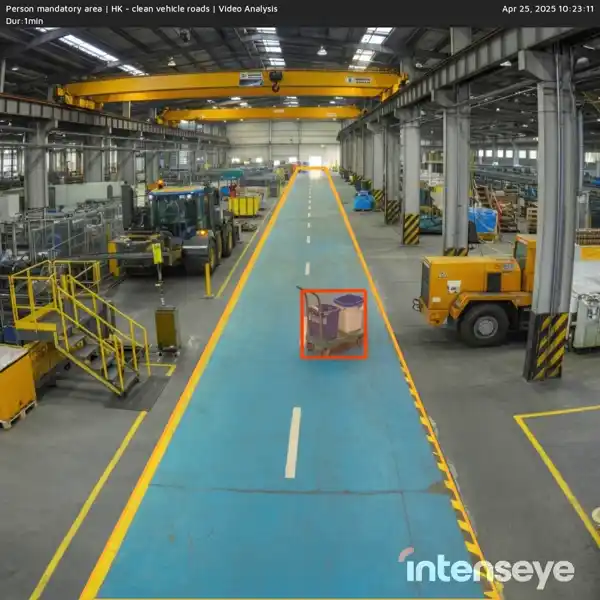
Clear vehicle paths
Detects obstructions blocking vehicle lanes and routes.
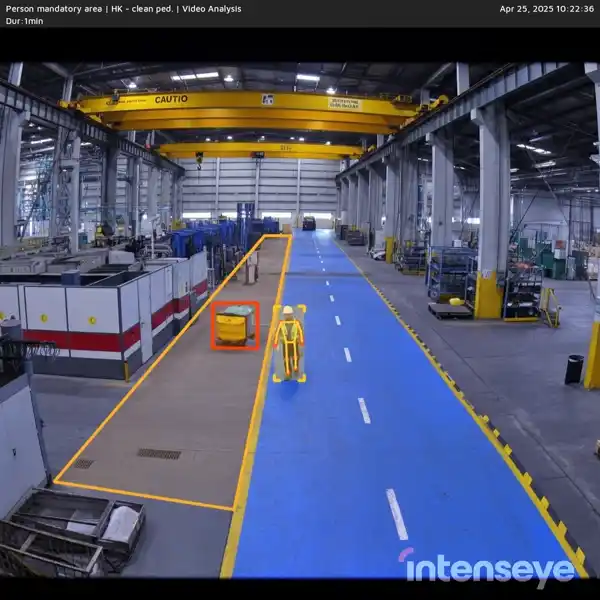
Clear walkways
Detects obstructions blocking pedestrian walkways.
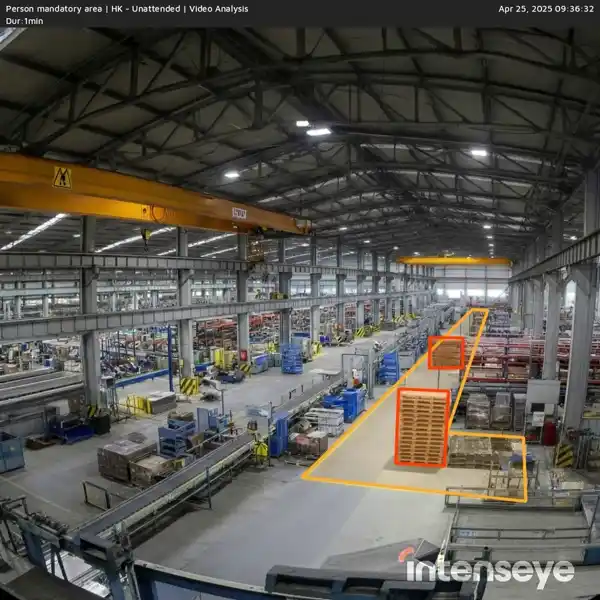
Unattended object
Flags objects left in walkways, exits, or work areas that create a trip or access hazard.
Why it matters to EHS leaders
Adapt to your housekeeping policies
Set custom rules for clear walkways, spill detection, and object placement to match your site’s safety standards.
Detect hazards big and small
Customize AI sensitivity to identify even small objects left in critical areas before they become safety risks.
Support SIF prevention with AI insights
Gain visibility into overlooked hazards that often precede serious incidents, enabling faster intervention and stronger site-wide risk control.
Housekeeping detections across industries
The first three industries are open below; expand another to read how each use case applies on that floor — the same per-industry context the full library shows when you filter by industry.
Industrial Manufacturing3 use cases
- Clear vehicle paths
- Ensures forklift and vehicle paths remain clear of debris to reduce collision and tipping risks.
- Clear walkways
- Identifies objects left in walkways that could lead to trips and obstruct safe movement.
- Unattended object
- Identifies misplaced tools, parts, or containers that pose tripping or contamination risks.
Food and Beverage3 use cases
- Clear vehicle paths
- Keeps forklift lanes and pallet drop zones clear of product or wrap debris to avoid accidents.
- Clear walkways
- Detects spills, tools, or packaging debris in walkways that pose slip or trip hazards.
- Unattended object
- Detects misplaced ingredients or tools in production areas that create contamination or slip hazards.
Automotive3 use cases
- Clear vehicle paths
- Detects misplaced tools or components in lanes used by forklifts and tuggers to prevent accidents.
- Clear walkways
- Ensures that hoses, parts, or debris are removed from pedestrian walkways inside the facility.
- Unattended object
- Detects dropped parts or tools that pose quality, safety, or contamination risks.
Industrial Machinery3 use cases
- Clear vehicle paths
- Ensures forklift and vehicle paths remain clear of debris to reduce collision and tipping risks.
- Clear walkways
- Identifies objects left in walkways that could lead to trips and obstruct safe movement.
- Unattended object
- Identifies misplaced tools, parts, or containers that pose tripping or contamination risks.
Chemicals3 use cases
- Clear vehicle paths
- Detects objects in chemical transport routes that could interfere with drum handling, tank access, or forklift movement.
- Clear walkways
- Identifies obstructions in chemical walkways—like hoses, tools, or packaging—that can cause slips, trips, or delayed emergency response.
- Unattended object
- Detects misplaced drums, containers, or tools in high-traffic chemical zones that could cause trip hazards or obstruct emergency egress.
Warehouses3 use cases
- Clear vehicle paths
- Detects items blocking vehicle lanes like spilled pallets or collapsed goods, reducing struck-by hazards.
- Clear walkways
- Identifies obstructions in walkways such as loose wrap, debris, or boxes that create trip risks.
- Unattended object
- Detects misplaced packages, pallets, or equipment that may create tripping hazards or block emergency exits.
Metals & Steel3 use cases
- Clear vehicle paths
- Detects obstructive materials in forklift and crane travel paths that increase collision potential.
- Clear walkways
- Identifies metal debris, slag, or tools left in walkways that pose trip or puncture risks.
- Unattended object
- Flags misplaced scrap, tools, or pallets in operating zones where they pose trip or fire hazards.
Building Materials3 use cases
- Clear vehicle paths
- Detects obstructive debris or stacked products in truck turnaround or forklift aisles to prevent collisions.
- Clear walkways
- Flags sand, spilled cement, or loose tools in walkways that create fall risks in high-traffic production paths.
- Unattended object
- Flags unsupervised pallets, molds, or hoses left in key production zones that obstruct operations.
Containers Packaging and Paper3 use cases
- Clear vehicle paths
- Flags debris or stacked loads in transport paths used by forklifts and roll handlers.
- Clear walkways
- Identifies straps, wrap, or scrap left in aisles that could cause slips and trip incidents.
- Unattended object
- Flags abandoned rolls, pallets, or bins in motion zones that can obstruct flow or tip hazardously.
Air Cargo, Logistics & Transportation3 use cases
- Clear vehicle paths
- Clears obstructions from ground tug routes, trailer approaches, or towbar return zones.
- Clear walkways
- Identifies tie-downs, straps, or loose cargo debris in foot traffic paths across docks or airside ramps.
- Unattended object
- Flags dropped boxes, tools, or shipping labels in movement zones where they obstruct loaders or carts.
Housekeeping in action
Runs on the CCTV you already own. No rip-and-replace. Add Sentinel devices only where a normal camera can't see - low light, heat, depth, or outdoor.
Detect
Tailor AI models to identify housekeeping hazards based on your facility’s unique requirements.
Act
Respond instantly with real-time alerts and insights, enabling proactive hazard mitigation.
Protect
Track improvements over time and maintain a clean, organized, and compliant workplace.
Related terms
Slip, Trip, and Fall
A leading category of workplace injury caused by loss of footing or balance, often linked to housekeeping, floor conditions, or working at height.
Unsafe condition
A hazard present in the environment - a spill, an unguarded machine, a blocked exit.
5S
A workplace organization method with five steps - sort, set in order, shine, standardize, and sustain - used to create a clean and efficient environment. Strong 5S also removes many everyday hazards.
Hazard
A source with the potential to cause harm.
Corrective action
A tracked task created to fix a detected risk, with an owner and a due date.
How to prevent slips trips and falls in the workplace
To prevent slips, trips, and falls in the workplace, it's crucial to maintain clear walkways, and well-lit areas, and utilize non-slip mats in potentially hazardous zones. Additionally, prompt cleanup of spills and providing employees with appropriate footwear are essential. Regular safety inspections should be conducted to identify and address any potential hazards before accidents occur. Implementing regular toolbox talks, where safety procedures are discussed and reinforced among employees, can also significantly contribute to accident prevention.
Intenseye's AI-powered safety management software offers a proactive approach to preventing slips, trips, and falls. By providing real-time analysis, the software can detect hazards as they arise, such as spills or obstacles, and immediately alert staff.
Moreover, through analyzing patterns and past incidents, Intenseye identifies high-risk areas and suggests preventive measures, enabling businesses to take proactive steps to mitigate risks. This software also facilitates compliance tracking, training support, and continuous improvement efforts, ensuring a safer work environment for employees and reducing the likelihood of accidents.
What type of hazard is a blocked exit?
A blocked exit poses serious safety hazards in workplaces. It impedes the safe evacuation of occupants during emergencies such as fires, earthquakes, or other crises, potentially leading to injury, loss of life, or property damage. As an EHS inspection software, Intenseye can prevent blocked exits by implementing regular inspections and maintenance protocols.
Intenseye’s housekeeping safety 24/7 analyzes exit routes, including corridors, stairwells, and doorways, so any obstructions or hazards can be promptly identified and addressed. Additionally, clear guidelines and training for occupants on keeping pathways clear of clutter or obstacles further contribute to maintaining accessible exits in case of emergencies. This proactive approach to housekeeping ensures that escape routes remain unobstructed, enabling swift and safe evacuations when needed.
What is the difference between corrective action and preventive action?
The difference between corrective action and preventive action is that corrective action addresses existing safety hazards in the workplace, while preventive action aims to prevent risks from occurring in the future. They address different aspects of the management system:
1. Corrective Action:
◦ Corrective action is taken in response to an existing problem, incident, or nonconformity that has already occurred.
◦ It aims to eliminate the root cause or causes of an identified issue to prevent its recurrence.
◦ Corrective actions are reactive measures that address the immediate problem and seek to rectify it.
◦ Examples include conducting investigations into safety incidents, implementing solutions to prevent recurrence, and addressing noncompliance with regulations or standards.
2. Preventive Action:
◦ Preventive action is taken to anticipate and mitigate potential safety risks, incidents, or nonconformities.
◦ It involves identifying and addressing underlying causes or weaknesses in processes or systems before they result in negative consequences.
◦ Preventive actions are proactive measures aimed at reducing or eliminating the likelihood of problems occurring.
◦ Examples include conducting risk assessments, implementing safety training programs, and instituting regular maintenance schedules.
In summary, corrective action deals with addressing existing issues, while preventive action focuses on identifying and mitigating potential future problems before they occur. Both are crucial for maintaining a robust EHS management system and continuously improving performance.
Intenseye utilizes AI-powered analytics to identify safety hazards in the workplace promptly, enabling corrective actions to be taken swiftly, while also providing insights to proactively implement preventive measures, thus fostering a workplace safety culture of continuous improvement and risk mitigation.
How does the system send an alert when an unsafe situation is observed?
When there is an unsafe act or condition, an image and a 12-second video of that moment are displayed on the platform. It is sent as a real-time notification in the form of SMS or email to the EHS specialists.
Explore the other categories
See the use cases in action on your floor
Reduce your safety risk today.