Gain full visibility into unsafe zones in real time
Area controls are camera-enforced zone rules: who and what may be where, when, in what numbers and for how long — with an alert the moment a rule is broken.
Area controls detection covers 8 real-time computer-vision use cases in the Intenseye detection & use case library — Collision risk zone, Machine zone access, Max worker limit, Min worker limit, Prohibited object detect, Restricted machine zone, Time-restricted zone and Worker required zone — on the cameras you already have or on Sentinel devices.
Even the most vigilant teams can’t be everywhere at once. Powered by AI, Intenseye’s Area Controls monitor high-risk areas in real time, helping EHS teams stay ahead of potential SIFs—not just react to them.
- Eliminate blind spots in high-risk zones
- Cut downtime risks by catching hazards early
- Stay audit-ready with automated insights
AI-powered area controls
Pre-set AI-powered area safety scenarios, trained for real-world worksites to maintain safety in dynamic environments.
Every site has zones with their own rules — a machine envelope no one should enter while it runs, a task that needs two people present, a corridor where nothing may be parked, a space no one should occupy past a set time. Area controls are those rules, drawn on the camera view and watched continuously instead of during the occasional walk-through.
Intenseye lets you draw each zone on the cameras you already have and attach the rule to it — occupancy limits, time restrictions, prohibited objects, required presence. Pre-trained models recognize people, vehicles, cranes and objects inside the zone; a breach triggers a real-time alert and is logged, so you can see which zones are breached, how often and when.
8 use cases in this category
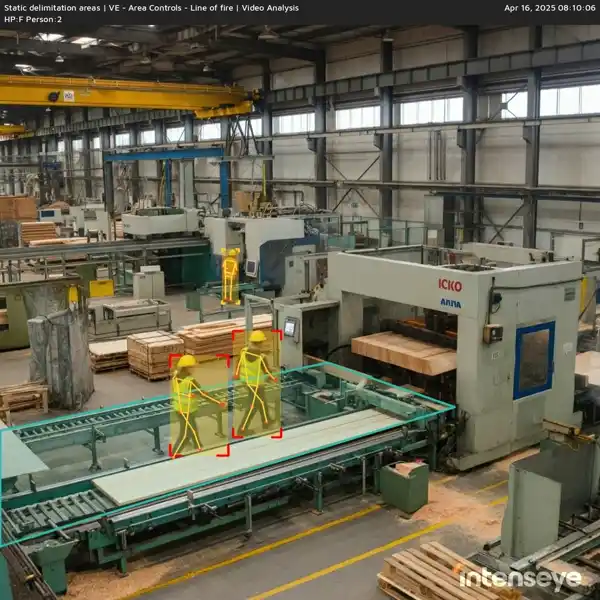
Collision risk zone
Flags when people or vehicles enter an area where converging paths create a struck-by risk.
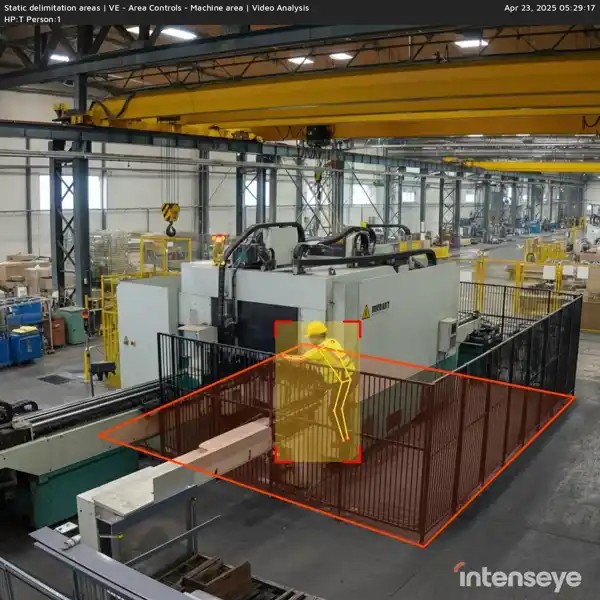
Machine zone access
Confirms only authorized workers enter the operating envelope of a machine.
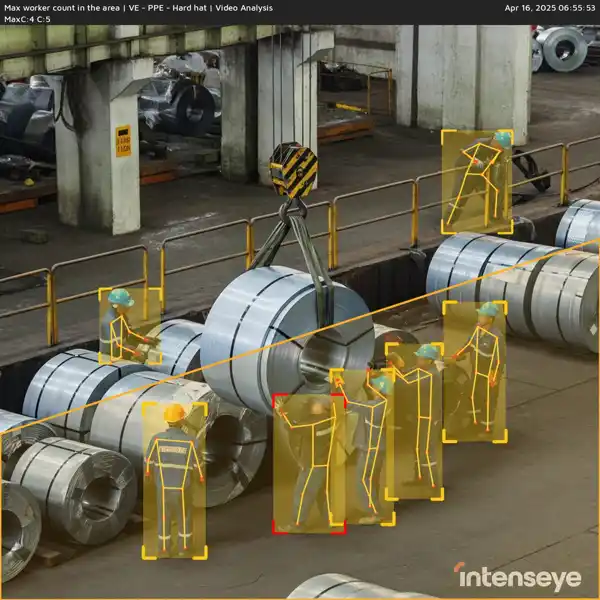
Max worker limit
Detects when the number of workers in an area rises above the safe limit for the task.
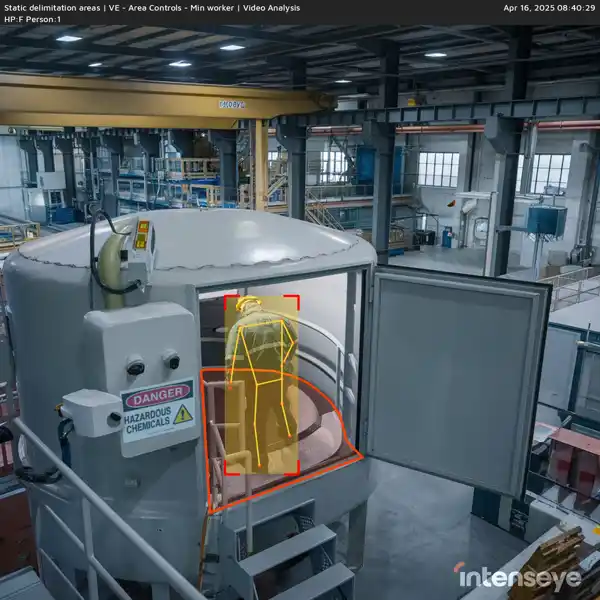
Min worker limit
Detects when the number of workers in an area falls below the safe minimum for the task.
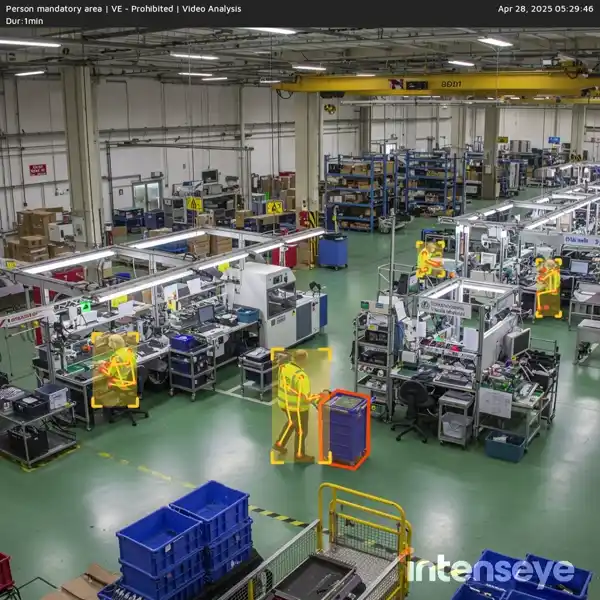
Prohibited object detect
Flags when a banned item or object appears in a controlled area.
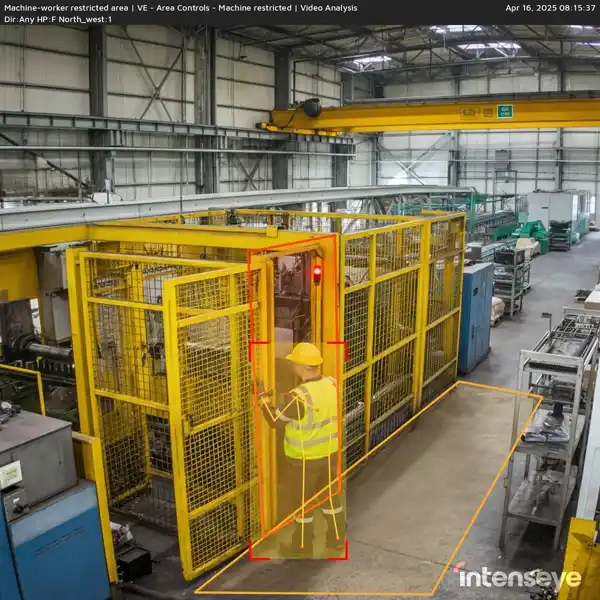
Restricted machine zone
Flags entry into a hazardous zone around running equipment.
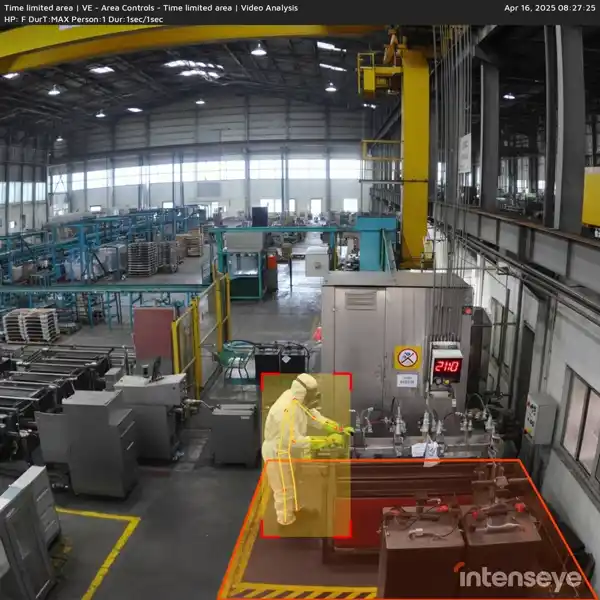
Time-restricted zone
Detects presence in an area during hours when access is not permitted.
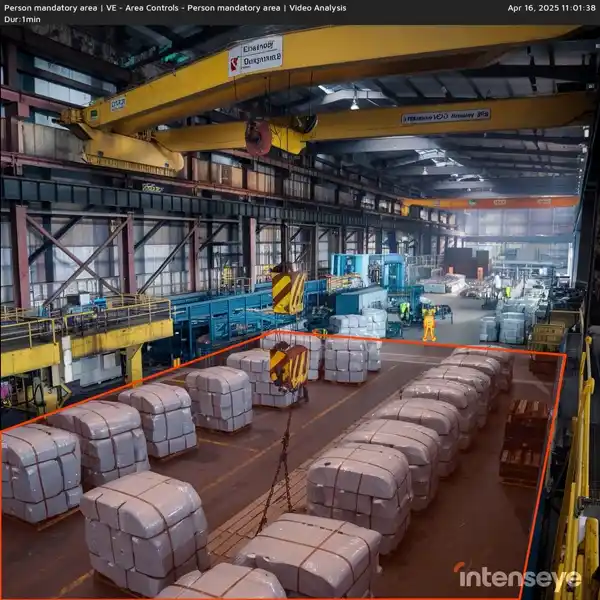
Worker required zone
Detects when an area that must be staffed is left unattended.
Why it matters to EHS leaders
Designed for industry standards
Recognize industry-standard cranes, vehicles, and objects to meet operational needs.
Control beyond limits
Set precise time, occupancy, and object restrictions to maintain safety and operational efficiency.
Tailored for your worksite
Our AI models are trained on your specific work zones—securely developed in-house with no external data sharing.
Area Controls detections across industries
The first three industries are open below; expand another to read how each use case applies on that floor — the same per-industry context the full library shows when you filter by industry.
Industrial Manufacturing8 use cases
- Collision risk zone
- Detecting collision exposure reduces crush and impact injuries near conveyors, press brakes, and robotic arms.
- Machine zone access
- Controls on machine zones reduce unintentional contact or entry during active or auto-restart sequences.
- Max worker limit
- Maximum worker limitations in manufacturing are critical to reduce entrapment, crush, and struck-by injuries in high-automation, narrow-space, or synchronized task environments.
- Min worker limit
- Minimum worker limitations ensure critical operations like lockout/tagout or heavy lifting have adequate personnel for safety compliance.
- Prohibited object detect
- Detecting unauthorized items helps avoid fire, contamination, or entanglement risks near active machinery and clean zones.
- Restricted machine zone
- Access control to restricted machine zones reduces the risk of entrapment or contact with energized equipment.
- Time-restricted zone
- ⏱️ Time-restricted zone controls protect workers from prolonged exposure to fumes, temperature extremes, or radiation sources.
- Worker required zone
- Ensuring key personnel presence in critical areas guarantees oversight during hazardous or high-consequence operations.
Food and Beverage8 use cases
- Collision risk zone
- Identifies workers in path of heat-sealing bars, rotating drums, or fast-moving belts to avoid impact or burn injuries.
- Machine zone access
- Prevents unauthorized entry to meat slicers, conveyors, or bagging equipment during operation or cleaning.
- Max worker limit
- Limiting worker count in food and beverage facilities helps reduce crowding near rotating slicers, hot fillers, or sanitation zones, minimizing burn, amputation, or chemical exposure risks.
- Min worker limit
- Ensures teams are present during CIP, maintenance, or lift-assist procedures where lone work poses hazard.
- Prohibited object detect
- Detects non-food-safe items in clean zones to prevent contamination or processing equipment jams.
- Restricted machine zone
- Protects workers from accidental startup of mixers, grinders, or packaging units during cleaning.
- Time-restricted zone
- ⏱️ Enforces time restrictions in refrigerated spaces or high-ammonia cleaning zones to prevent hypothermia or respiratory exposure.
- Worker required zone
- Verifies operator presence at inspection, batch release, or fill control stations to prevent quality or overflow incidents.
Automotive8 use cases
- Collision risk zone
- Detects workers in the travel path of robotic arms, lift tables, or pneumatic presses to prevent crush injuries.
- Machine zone access
- Restricts entry into active robotic welding zones, stamping machines, or conveyor-mounted presses.
- Max worker limit
- Worker count limits in automotive facilities prevent congestion in welding cells, lift stations, or battery pack zones—reducing arc flash, crush, and entrapment risks.
- Min worker limit
- Ensures enough technicians are present for dual-operator tasks like torqueing wheels, inspections, or battery lifts.
- Prohibited object detect
- Detects tools or parts left in engine bays or on conveyors that could cause jams or quality defects.
- Restricted machine zone
- Prevents unauthorized presence in robot cage areas or testing dynos during operation.
- Time-restricted zone
- ⏱️ Monitors time in high-fume zones like welding or painting booths to reduce exposure to harmful airborne contaminants.
- Worker required zone
- Ensures operators are present at fill, torque, or diagnostic workstations to validate safety steps.
Industrial Machinery8 use cases
- Collision risk zone
- Detecting line-of-fire exposure reduces crush and impact injuries near conveyors, press brakes, and robotic arms.
- Machine zone access
- Controls on machine zones reduce unintentional contact or entry during active or auto-restart sequences.
- Max worker limit
- Max Worker Count limitations in manufacturing are critical to reduce entrapment, crush, and struck-by injuries in high-automation, narrow-space, or synchronized task environments.
- Min worker limit
- Minimum worker count monitoring ensures critical operations like lockout/tagout or heavy lifting have adequate personnel for safety compliance.
- Prohibited object detect
- Detecting unauthorized items helps avoid fire, contamination, or entanglement risks near active machinery and clean zones.
- Restricted machine zone
- Access control to restricted machine zones reduces the risk of entrapment or contact with energized equipment.
- Time-restricted zone
- ⏱️ Time-restricted zone controls protect workers from prolonged exposure to fumes, temperature extremes, or radiation sources.
- Worker required zone
- Ensuring key personnel presence in critical areas guarantees oversight during hazardous or high-consequence operations.
Chemicals8 use cases
- Collision risk zone
- Identifies workers in the path of rotating mixers, pipe movement, or pressure-relief zones where sudden mechanical energy can cause serious injury.
- Machine zone access
- Restricts access to active chemical pumps, centrifuges, and mixers during operation to prevent entanglement or exposure to high-pressure systems.
- Max worker limit
- Limiting personnel in chemical process zones reduces exposure in case of leaks, spills, or emergency evacuations.
- Min worker limit
- Ensures critical chemical operations like confined space entry, emergency response, or hazardous transfers have proper staffing for safety enforcement and incident response.
- Prohibited object detect
- Detects non-compatible or flammable items in process zones to prevent unintended reactions, ignition risks, or cross-contamination of raw materials.
- Restricted machine zone
- Prevents unauthorized access to enclosed chemical processing machinery during operation, flushing, or depressurization.
- Time-restricted zone
- ⏱️ Ensures workers don’t exceed safe exposure durations in confined chemical storage or inert gas environments where oxygen displacement or toxic accumulation is a risk.
- Worker required zone
- Verifies operator presence at pH monitoring stations, emergency cutoffs, or dosing panels to ensure continuous supervision of sensitive reactions.
Warehouses8 use cases
- Collision risk zone
- Identifies personnel at risk of contact with moving tuggers, conveyor edges, or automated doors.
- Machine zone access
- Prevents unauthorized access to high-risk areas like balers, conveyors, or stretch-wrapping equipment.
- Max worker limit
- Reduces the chance of collisions, bottlenecks, or delayed emergency exits in congested pick, pack, and staging zones.
- Min worker limit
- Ensures two-person teams are present during tasks like lifting oversized loads or refueling equipment for safety compliance.
- Prohibited object detect
- Flags misplaced equipment, tools, or packaging that could obstruct forklift paths or exits.
- Restricted machine zone
- Prevents personnel from entering active compactor zones or operating conveyors without proper lockout.
- Time-restricted zone
- ⏱️ Prevents overexposure to cold or heat in walk-in freezers or hot dock staging areas by enforcing time limits.
- Worker required zone
- Ensures required operators are present at scan stations or dock safety panels before workflows start.
Metals & Steel8 use cases
- Collision risk zone
- Identifies exposure to stamp presses, drop hammers, or ejecting parts during high-force operations.
- Machine zone access
- Restricts entry to presses, rolling mills, or shearing machines while operational to prevent crush injuries.
- Max worker limit
- Limits personnel in casting and forging cells to prevent crowding near high-temperature equipment or pinch points.
- Min worker limit
- Ensures proper team presence for safe manipulation of dies, coils, or plate during heavy setup tasks.
- Prohibited object detect
- Detects non-metallic materials or tools in molten processing zones that could cause explosions or quality defects.
- Restricted machine zone
- Blocks access to robot arms, induction furnaces, or automated handling arms during cycles.
- Time-restricted zone
- ⏱️ Prevents prolonged exposure near furnaces or induction heaters to avoid heatstroke and fatigue-related mistakes.
- Worker required zone
- Verifies operator presence at rolling mill, mold station, or cooling tunnel before system starts.
Building Materials8 use cases
- Collision risk zone
- Detects exposure to pinch points, mold clamping systems, or rotating mixers in motion.
- Machine zone access
- Blocks access to automated molding machines, mixers, and extruders unless properly locked out.
- Max worker limit
- Limits congestion near mixing platforms, conveyor drop points, or kiln entry zones to reduce entrapment risk.
- Min worker limit
- Ensures presence of co-workers during tasks involving heavy load positioning or rotating equipment start-up.
- Prohibited object detect
- Flags misplaced tools or debris in curing chambers or near conveyor belts that can jam systems or spark fires.
- Restricted machine zone
- Prevents access to active shaping rollers, hydraulic press beds, or saw paths during live cycles.
- Time-restricted zone
- ⏱️ Monitors presence in kiln rooms or enclosed mixer pits where prolonged exposure to heat or dust is dangerous.
- Worker required zone
- Confirms presence of operator at curing cycle control, mold ejection station, or material feed monitors.
Containers Packaging and Paper8 use cases
- Collision risk zone
- Detects unsafe positions near nip points, print cylinders, and automated feed arms during machine cycles.
- Machine zone access
- Prevents access to active guillotines, slitters, or bindery equipment during high-speed cycles.
- Max worker limit
- Controls crowding around laminators, trimmers, or bundling areas to reduce crush and trip hazards.
- Min worker limit
- Ensures minimum team staffing for safe roll changes, sheet alignment, or shift-start inspections.
- Prohibited object detect
- Flags non-conforming materials or personal items near paper stock or ink systems to prevent contamination or jams.
- Restricted machine zone
- Prevents untrained access to packaging lines or roll unwinders under automatic control.
- Time-restricted zone
- ⏱️ Tracks time in confined coating or oven zones where prolonged exposure can lead to respiratory strain or heat exhaustion.
- Worker required zone
- Confirms required operator presence at print registration consoles and packaging validation points.
Air Cargo, Logistics & Transportation8 use cases
- Collision risk zone
- Detects workers positioned near trailer gates, aircraft belts, or moving conveyors where sudden motion could cause injury.
- Machine zone access
- Prevents access to container loaders, sortation rollers, or trailer dock locks during active cycles.
- Max worker limit
- Prevents overcrowding near loading docks, belt ends, or cargo containers where mobility and awareness are critical.
- Min worker limit
- Ensures team presence for safe lift gate operation, container securing, or dual-verification during high-value shipment handling.
- Prohibited object detect
- Flags unauthorized items like tools or unsecured goods in aircraft bays, trailers, or sortation lines.
- Restricted machine zone
- Blocks access to automated tugs, rollers, or belt loaders unless de-energized and locked out.
- Time-restricted zone
- ⏱️ Tracks worker presence near aircraft holds or cold-chain units where long exposure leads to fatigue or hypoxia risk.
- Worker required zone
- Verifies staffing at spot-check stations, hazardous goods checks, and final load confirmation steps.
Area controls in action
Runs on the CCTV you already own. No rip-and-replace. Add Sentinel devices only where a normal camera can't see - low light, heat, depth, or outdoor.
Detect
Customize AI models to monitor area-specific safety rules based on your operational needs.
Act
Respond to real-time alerts and AI-driven insights to manage risks and maintain safe operations.
Protect
Ensure compliance with area-specific controls by evaluating performance and refining safety measures.
Related terms
Hazard
A source with the potential to cause harm.
Line of Fire
The path or zone where a worker could be struck, caught, or crushed by a moving object, released energy, or a falling load.
Confined Space
An enclosed or partially enclosed area not designed for continuous occupancy, where limited entry and exit or a hazardous atmosphere can put workers at serious risk.
Permit to Work
A formal authorization that controls high-risk activities, defining who can perform the work, under what conditions, and what precautions must be in place.
LOTO
Lockout/Tagout - procedures that isolate energy sources before maintenance so machines cannot start unexpectedly.
Dwell
How long people, vehicles, or assets stay in a given area. High dwell time flags bottlenecks, queuing, or workers lingering in a hazard zone longer than the task should require.
Detection Rule
A configured condition that defines what a computer vision system should watch for, such as a specific unsafe behavior, missing equipment, or access to a hazardous area. Often called a use case.
How artificial intelligence covers area control safety risks
Artificial intelligence can analyze real-time data to cover area control safety risks. Continuously analyzing the decided area, AI can detect unsafe acts & conditions from expected trends within a specific area.
By employing Intenseye's AI workplace safety software you can limit the number of employees in an area, identify the cases of working under suspended load, set exclusion zones, and set other limitations to prevent safety incidents.
What kinds of EHS scenarios can be set up as a rule on your platform?
Within our safety management software, a variety of Core AI features can be activated to detect unsafe acts and conditions in your workplace.
The PPE detection model can be used to ensure a safe working environment by detecting the use of Helmet, Glove, Apron, Sleeve, Respiratory Protective Equipment, Reflective Vest, and Glasses.
The Area Controls model can be used to ensure working areas in your facility are always safe with various EHS scenarios such as establishing worker minimum and maximums, preventing workers from entering restricted areas, and minimizing occupational exposures through time limits.
The Housekeeping model can be used to reduce the risks of slips, trips, falls and collisions by ensuring that vehicle paths and pedestrian walkways in your facility are always clear and safe.
The Vehicle Controls model can be used to manage your workplace traffic safety by ensuring the safe operation of vehicles at your workplace.
The Behavioral Safety model can be used to avoid the line of fire injuries such as pedestrians in vehicle paths, nonuse of handrails, and violations of working at heights.
The Pandemic Control Measures model can be used to prevent contagious diseases by ensuring social distancing as well as proper mask use.
The Emergency Alerts can be used to get immediate notifications in situations such as when a worker falls on the ground or there is a fire-related emergency.
What’s more, with Ergonomics AI, our system detects risky actions for the body and prompts the managers to take the situation under control before any hazardous conditions arise. A variety of use cases can be set up as a rule under our ergonomics software to detect unsafe body movements, which are Trunk Position, Trunk Twisted Position, Trunk Side Bending Position, Lower Arm Position, Upper Arm Position, Neck Position, Neck Bending Position, and Arm Working Position.
How can we activate EHS scenarios?
EHS scenarios can be set up as a rule by selecting the area where the rule will be applied through the cameras. For the setup of each scenario, it is necessary to add no more than three to four parameters, which takes less than a minute. For example, when creating a Social Distancing rule, it is necessary to select the area, the desired distance between the personnel, and the duration for how long they can stand at that distance to trigger an alert in case.
Besides, as long as there are no changes in camera angles or the rule area, it is enough to configure rules just once.
How does the system send an alert when an unsafe situation is observed?
When there is an unsafe act or condition, an image and a 12-second video of that moment are displayed on the platform. It is sent as a real-time notification in the form of SMS or email to the EHS specialists.
Explore the other categories
See the use cases in action on your floor
Reduce your safety risk today.